In public relations, workflow is everything. Here are seven (plus a sneaky eight at the end) tools that I use on a daily basis that could help you to stay organized and even do more than would otherwise be possible.
One caveat, these tools are largely for people using Gmail. If you use another email platform, like Outlook, you can check out these add ons. If you are on a Mac, you should also check out the tools my friend Michael Schechter uses.
Also, two of the recommended tools, Asana and Diigo, are platform agnostic.
Go Professional with Gmail

If you are using GMail you should consider paying the $50 per year, per user and getting Google Apps. This will allow your calendar to work with your branded email seemlessly and has some other benefits, like letting your team share calendars and scheduling, much like Outlooks allows in team environments, but for much less than an Outlook server. You can read the Small Business Guide to Google Apps to get you started.

Write That Name is a French startup which updates your Google Contacts. I used to spend 15 or more minutes a week doing what Write That Name does automagically. This saves me 13 hours a year at least. There is a free version to update 20 contacts a month, I pay $23 per year to get unlimited service and have some control over the account. I also love that the CEO Phillipe Laval is so responsive on Twitter @writethatname
Getting Organized

The basic ActiveInbox package is free, but I pay the $24.95 per year because it is just that good. It is a Gmail addon that can be use in Chrome and Firefox. It lets you organize your tasks and project folders in Gmail to and do simple CRM. You can also use it to get a zero inbox and use the GTD system, for those who are into it. I am not even close to completely utilizing the power of this app yet.

Asana is one of the most talked about startups of last year with an all-star team, including co-founder of Facebook Dustin Moskovitz. This is great if you are working on tasks with a team, or even on your own. You can set up workspaces and then projects inside of those workspaces and finally add tasks to those projects. You can assign different people to each task and get email reminders of what is due and when. Everyone on the project can assign tasks. You can read an in-depth review on Lifehacker here. Asana is free for teams up to 30 members and then pricing starts at $100/month and goes up from there.
Engagement and Outreach
Rapportive for Gmail and Google Apps

Rapportive connects your email interactions with your social networks. When an email comes in, it allows you to follow that person on Twitter, friend them on Facebook, request to connect on LinkedIn and numerous other channels. Everything that the email connects with shows up in the right sidebar. I have used this to connect with new clients, prospects and just new friends. It is invaluable to give me the info I need about each new (and sometimes old) contact.

ToutApp advertises itself as a great app for sales, and I can see how it would be very useful for that. But it is also a really useful application for PR work. You can keep track of email pitches through its easy to use interface, and you can put together templates to use for all kinds of correspondence. Because it is a one to one email sent directly from my email address, and because each email can be customized, it doesn’t feel spammy. Also, it ensures all the formatting stays the same. I have used it to pitch bloggers, organize speakers for events and many other uses. You can read some of the may ways you can use Tout on its help site. There is a free and paid version. The free version allows five emails per day and allows three templates. Bigger plans start at $30 per month.
Organizing my Brain
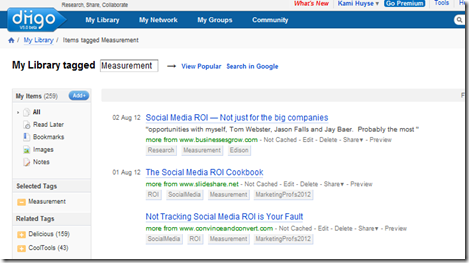
Working online makes one a voracious consumer of information. One way that you can categorize all the information you see every day and turn it into your own personalized library is by tagging your links and saving them. I have saved nearly 7,000 links since I started doing this on Delicious. More recently, I imported all of my links into Diigo, and I love this tool. It allow you to annotate a link on the fly, add sticky notes and make public or private lists that you can share with others, and which allow them to see the web pages in a handy slideshow format. Since each tag has its own RSS feed, you can use a service like TwitterFeed to send the content to other social networks based on the tag you give it (no unsightly hashtags needed). Better yet, you can still synch back to Delicious, so that your extensive library of links is always backed up.
Hope you find one or two of these tools useful to improve your productivity. As with any tools, consistency of use is the key. There have been many tools I have used and abandoned, but these tools have “stuck” for me. Which tools have you found invaluable?